Turn Screen Recordings into Clear Step-by-Step Guides

Turn screen recordings and videos into clear how-to guides, screenshots, and help center articles. Capture a workflow once, then let AI draft the documentation in minutes.

Video to documentation

Turn Screen Recordings into Step-by-Step Guides

Produce a howto article in seconds from a screen recording, complete with screenshots, written instructions, and notes for your help center.

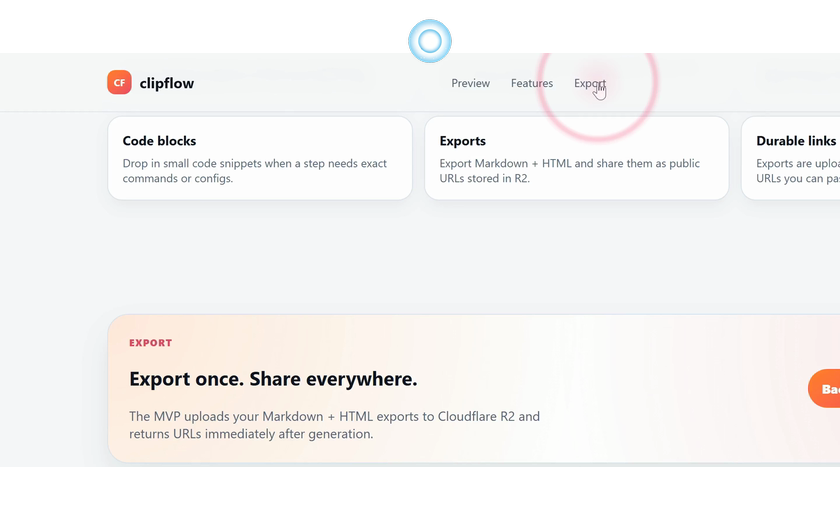
1

Click Preview

Click Preview. Confirm the expected UI change on screen.

Click Preview screenshot

Navigates to: http://localhost:8790/features/help-articles

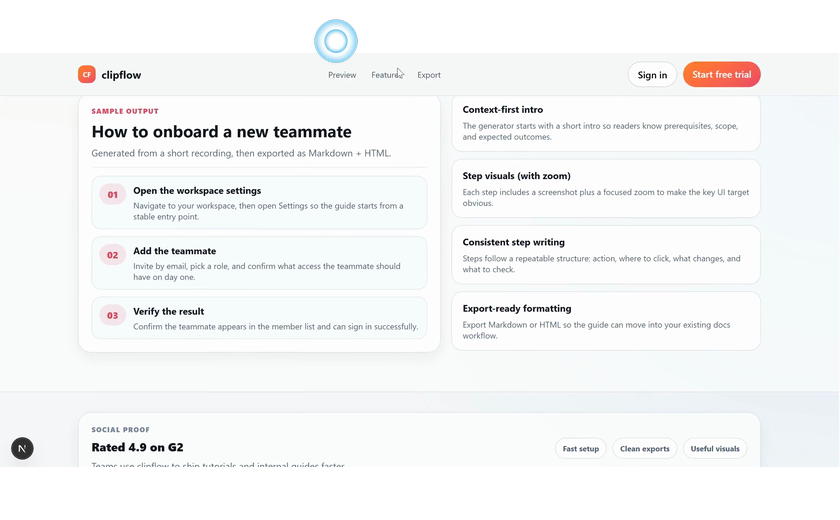
2

Click Features

Click Features. Confirm the expected UI change on screen.

Click Features screenshot

Navigates to: http://localhost:8790/features/help-articles#preview

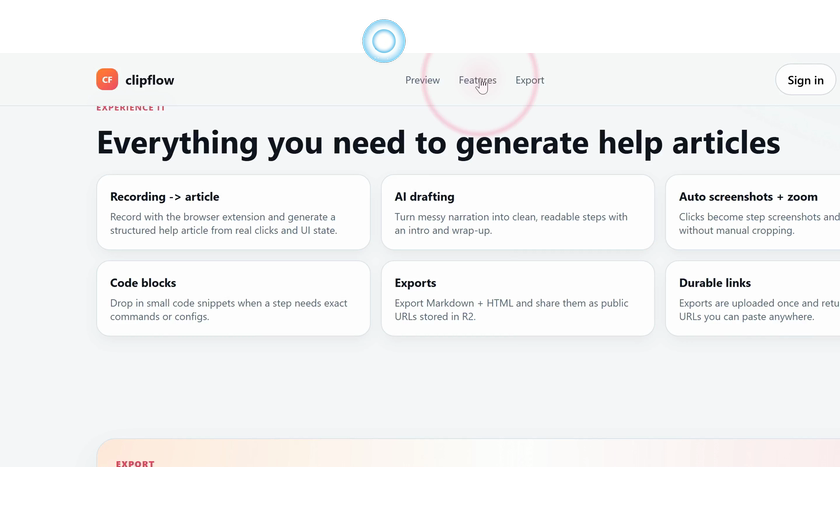
3

Click Export

Click Export. Confirm the expected UI change on screen.

Click Export screenshot

Navigates to: http://localhost:8790/features/help-articles#features

AI documentation tool

Create Help Articles from Videos

Convert a screen recording, product video, or rough walkthrough into a polished help center article with screenshots, notes, and publish-ready documentation.

Screen recording to guide

Capture a workflow, then turn screen recording to article or guide.

AI help article generator

Draft a howto article from clicks, transcript, screenshots, and AI.

Video to documentation

Convert videos into documentation with screenshots and written steps.

Add code snippets for API docs

Add code snippets for API or integration docs with exact commands.

Publish to your help center

Export Markdown and HTML into help center documentation.

Training and onboarding software

Create SOPs, training guides, and onboarding docs from recordings.

Turn Screen Recordings into Step-by-Step Guides

Capture once, then generate a howto guide with screenshots and notes.

Create Help Articles from Videos

Use video to article workflows for tutorials, SOPs, and onboarding.

Generate Screenshots and Written Instructions Automatically

AI extracts actions from screen capture software into clear instructions.

Resources

Built for Support, Product, Training, and Onboarding Teams

Use clipflow as screen recording documentation software for blog help center content, API or integration docs export, SOP creation, and onboarding guides.

Support teams

Create help center documentation from customer workflows.

Product teams

Turn product walkthroughs into video documentation and docs.

Training teams

Use training video software outputs for SOPs and onboarding.

Developer docs

Add code snippets for API or integration docs export.

FAQ

Frequently Asked Questions

What is an AI help article generator?

An AI help article generator turns screen recordings and videos into step-by-step guides, screenshots, and help center documentation without writing every instruction manually.

How do I turn a screen recording into a step-by-step guide?

Record a workflow, let the AI detect clicks and screen context, then review the generated guide before publishing it to your docs or help center.

Can I create help articles from videos?

Yes. The video to documentation workflow converts product videos and rough screen recordings into help articles with screenshots, body text, and notes.

Can this work as a help center article generator?

Yes. It works as a help center article generator for support docs, product tutorials, video documentation, and screen recording to article workflows.

Do I need separate screen capture software or recording software?

No. You can use the Chrome extension to capture a workflow, then convert that recording into documentation, guides, and help center articles.

Is this useful for SOPs, training, and onboarding documentation?

Yes. Teams can use it as SOP creation software, training video software, and onboarding documentation software for repeatable workflows.
Publish documentation

Publish Help Center Documentation from AI Articles

Export Markdown and HTML from your AI help article generator, then publish help center documentation, SOP creation software outputs, training guides, and onboarding docs directly from one generated article.